For the challenge this week we were tasked with utilising prototyping techniques to reverse engineer an existing creative artefact and then rebuild it as a quick prototyped representation.
For this challenge I chose to look at the chest mechanics from the Fortnite Battle Royale video game. My reasoning behind this was because while simple in its final recreation I had a feeling there was a lot more going on in the background in order to produce the results we see on screen when playing.
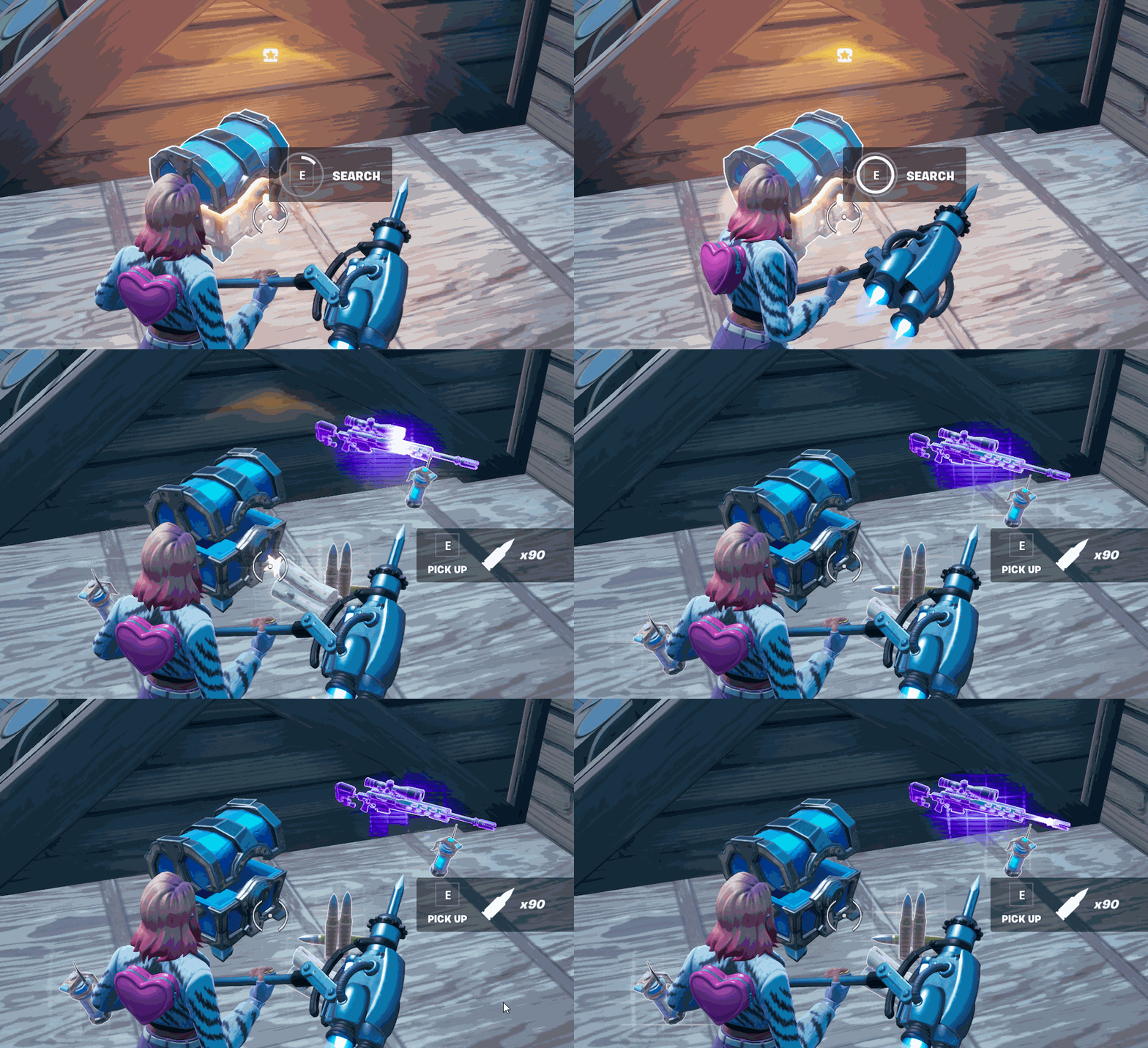
So as you can see from the image above the chest mechanic simply delivers loot to the player upon interaction, however the contents of chest are randomly generated and its contents are contrived from a large pool of possibilities.
So my first port of call on this one was to try and break down the different things that are happening on both a mathematical and aesthetic level. I decided to utilise one of my most trusted prototyping methods in order to do this so cracked out the Post It Notes and went at it.
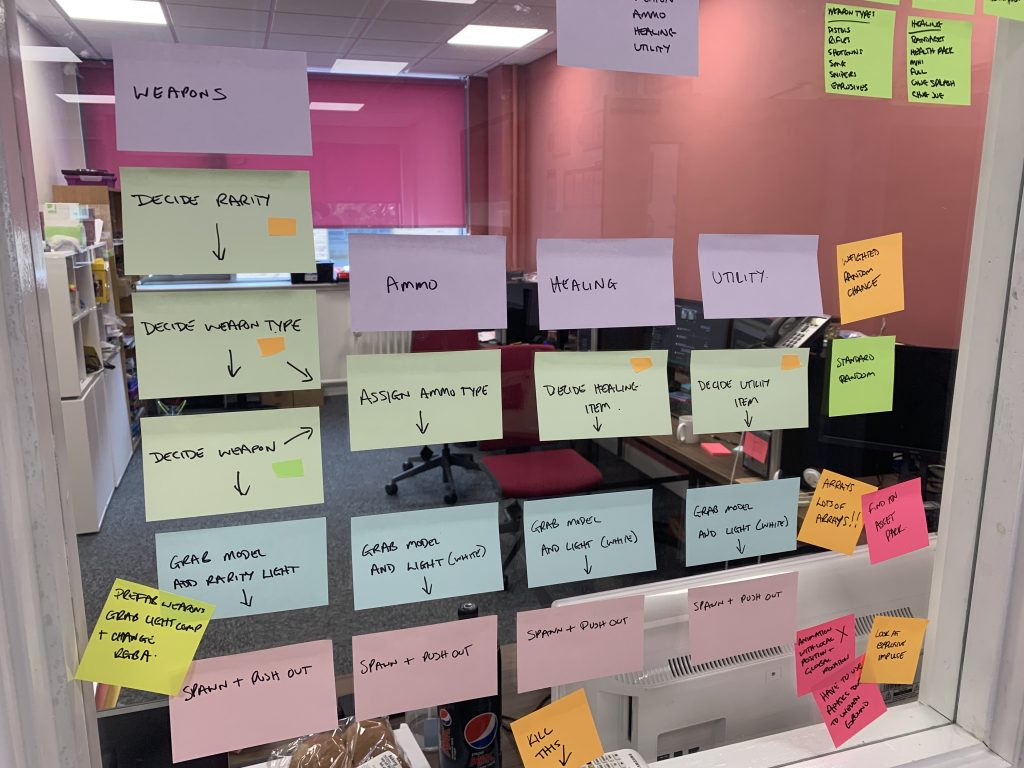
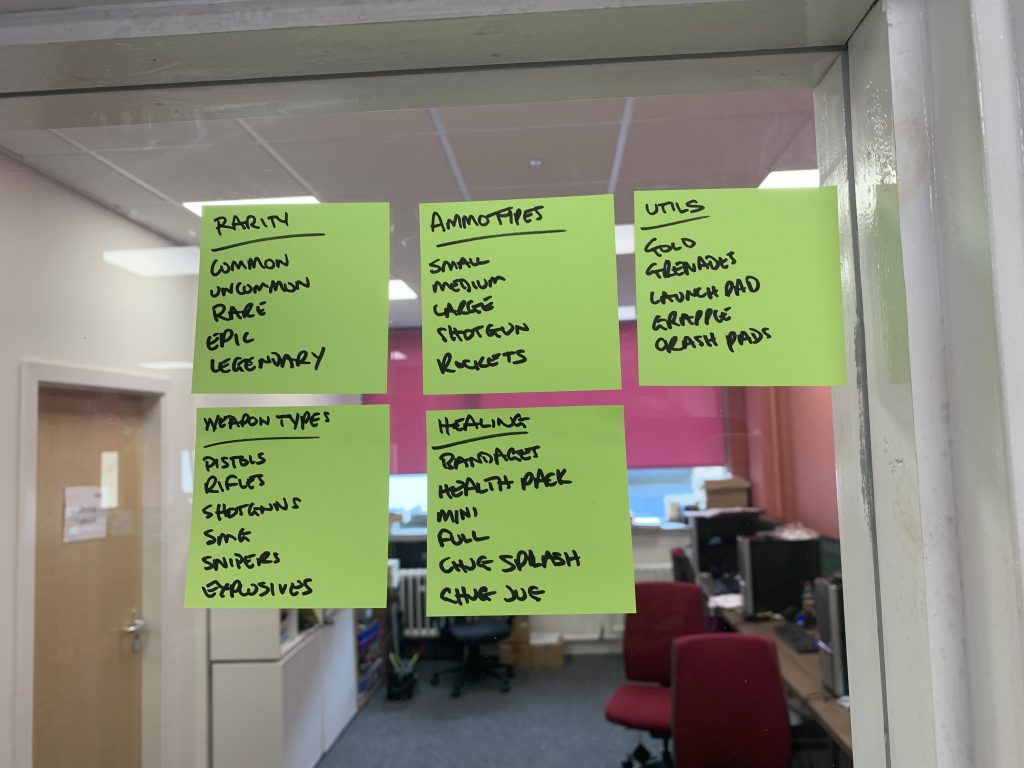

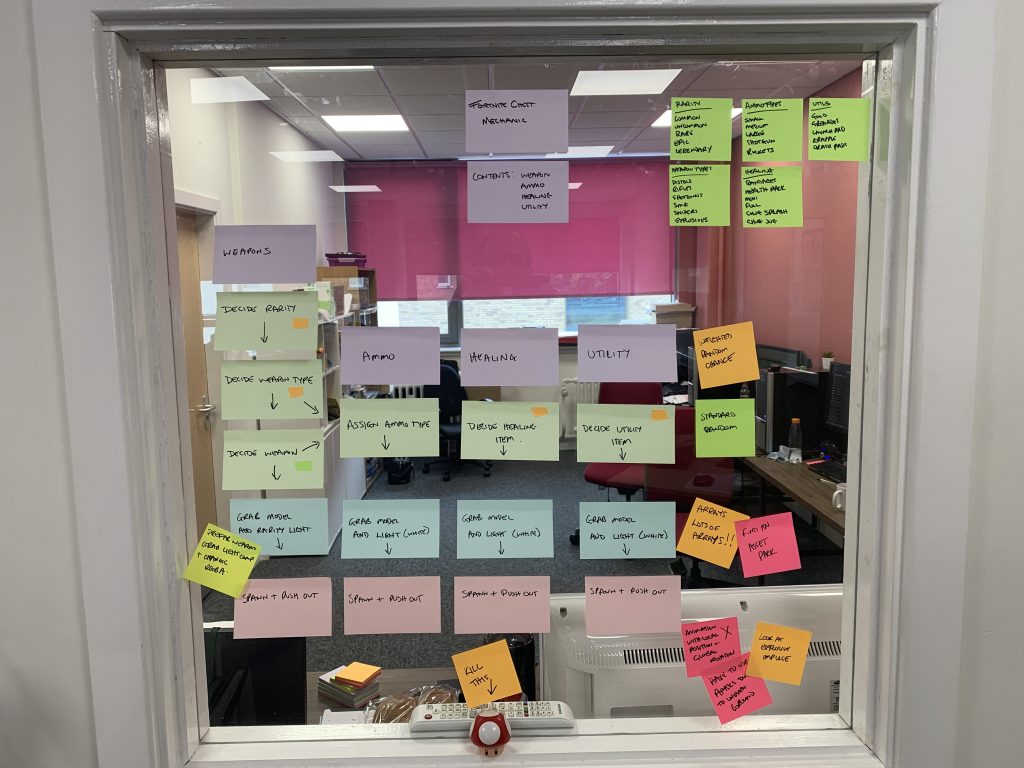
So I broke it down as much as I could and I took a few liberties at this point, so not all the weapons are in there and the visuals are not 100% identical to the original. I also began to throw down a few ideas on how I might be able to rebuild this mechanic back up. Dey (2021) produced an article on data gathering by a group of Fortnite data miners that detailed some of the mathematical mechanics that are being utilised within the source code, however as this is not a first hand source of information I only used it as an informative starting point, this is why some liberties were taken. I also really only wanted to understand the basics of the mechanics and recreate it exactly.
Once I had this exercise finished I was relieved to see that my initial ideas of it being a two part system, mathematical and aesthetic, were correct, so I decide to approach the mathematics first.
Weighted Random Number Generation
So at its core the system uses random number generation to determine what it selects to put in to the chest, however this randomness is not really 100% random. HYPEX (2021) detailed the data-mined numbers for the Season 2 Chapter 5 loot pool, however this information quickly went out of data as new weapons and content were added to the game, but it does highlight that the chances of specific weapons and weapon rarities are not evenly spread and certain bias is placed upon different aspects of the loot pool in order to balance out the spread of loot.
This is where I needed to do a little research into how to accomplish this within code. I discovered, as with anything in code, there are a few ways to achieve a result but one method that seemed to come up more than often was to utilise different weights or percentages to generate an array with multiple instances of the different choices. Once this array has been created you can use its length to generate a random number that will decide which element would be picked.
This method was detailed in a StackOverflow (2021) post by contributor Drake, who demonstrated it using Javascript.
|
1 2 3 4 5 6 7 8 9 10 11 12 13 14 15 |
var elems = ["A", "B", "C", "D"]; var weights = [2, 5, 8, 1]; // weight of each element above var totalWeight = weights.reduce(add, 0); // get total weight (in this case, 16) function add(a, b) { return a + b; } // helper function var weighedElems = []; var currentElem = 0; while (currentElem < elems.length) { for (i = 0; i < weights[currentElem]; i++) weighedElems[weighedElems.length] = elems[currentElem]; currentElem++; } console.log(weighedElems); |
This method produces an array with the following contents, as you can see the chance of pulling out a C over a D is statistically more common:
|
1 |
["A", "A", "B", "B", "B", "B", "B", "C", "C", "C", "C", "C", "C", "C", "C", "D"] |
While this method seemed like it would be suitable I did not want to specifically create more arrays than needed and wanted to maintain the use of inputted data in order to achieve a similar result. With this in mind I did some more research and found a different solution exampled by Groote (2017) on StackOverflow that utilised a Weighted Chance Parameter class which was then used to execute a mathematical ratio function to produce a result based on entered data. While this method looked to be a direction I could head in, it was the original question in the thread that made me realise I was over thinking this problem and that I could do this very simply by simply generating a number from 100 and use percentage based if statements to decide a result.
|
1 2 3 4 5 6 7 8 9 10 11 12 13 14 15 |
Random random = new Random(); int x = random.Next(1, 101); if (x < 11) // Numbers 1..10 ( A -> 10% ) { do_something1(); } else if (x < 41) // Numbers 11..40 ( B -> 30 % ) { do_something2(); } else if (x < 101) // Numbers 41..100 ( C -> 60 % ) { do_something3(); } |
So at this point I cracked open Unity and began making things. Firstly I just wanted to work on deciding on a weapon rarity. My data pool consisted of 5 strings, Uncommon, Common, Rare, Epic and Legendary as these are the main rarities in the video game, with their probability spread as 50%, 20%, 15%, 10%, 5%. So I created a function that randomly generated a float between 0 and 100 and used this to decide which if statement it was going to run. The result of this if statement would produce a string to let me know which one had been chosen.
|
1 2 3 4 5 6 7 8 9 10 11 12 13 14 15 16 17 18 |
void GenerateRarity () { //Rarities = 0 - Common 50%, 1 - Uncommon 20%, 2 - Rare 15 %, 3 - Epic 10%, 4 - Legendary 5% float tempRarity = Random.Range(0, 100); if (tempRarity <= 50){ s_Rarity = "Common"; } else if (tempRarity > 50 && tempRarity <= 70) { s_Rarity = "Uncommon"; } else if (tempRarity > 70 && tempRarity <= 85) { s_Rarity = "Rare"; } else if (tempRarity > 85 && tempRarity <= 95) { s_Rarity = "Epic"; } else { s_Rarity = "Legendary"; } } |
This produced a result that looked like it did what I need it to. I ran the program 1000 times and it returned the following results. Pretty close to what I would expect given the percentages.
| Uncommon | 490 |
| Common | 204 |
| Rare | 154 |
| Epic | 108 |
| Legendary | 44 |
So once I had a working version of the mathematics I just had to work out the order in which to run them, and produce similar functions to generate weighted randomness at each stage. The stages I decide upon was to decide the weapon rarity first, then to move on to decide the weapon group (weighted) from which I would pick a specific weapon (unweighted). I then added in the other elements of the chest such as health and utility items. I also added in an ammo choice but this was done through the weapon group choice.
All I needed then was a way to display all this data, and what I ended up with was one of the messiest Unity Inspector windows I have ever created. So I tidied it up a little and the end result looked a lot nicer.
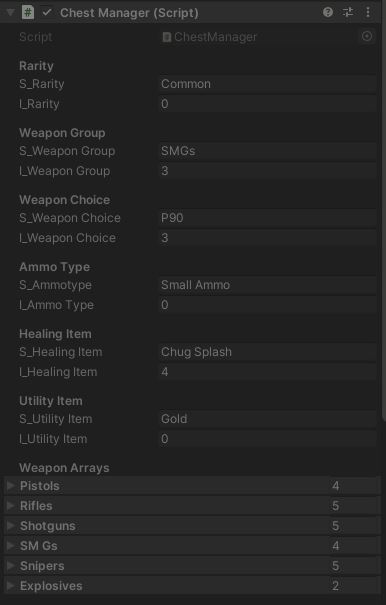
I created a quick UI in order to display this data on screen and added a button in order to manually generate a chest on click. I was still using my debug code to automatically generate results so I decided to run it a million times to see what happened. This is what got pumped out the other side (it stalled my machine for about 5 seconds so I was happy with code efficiency).
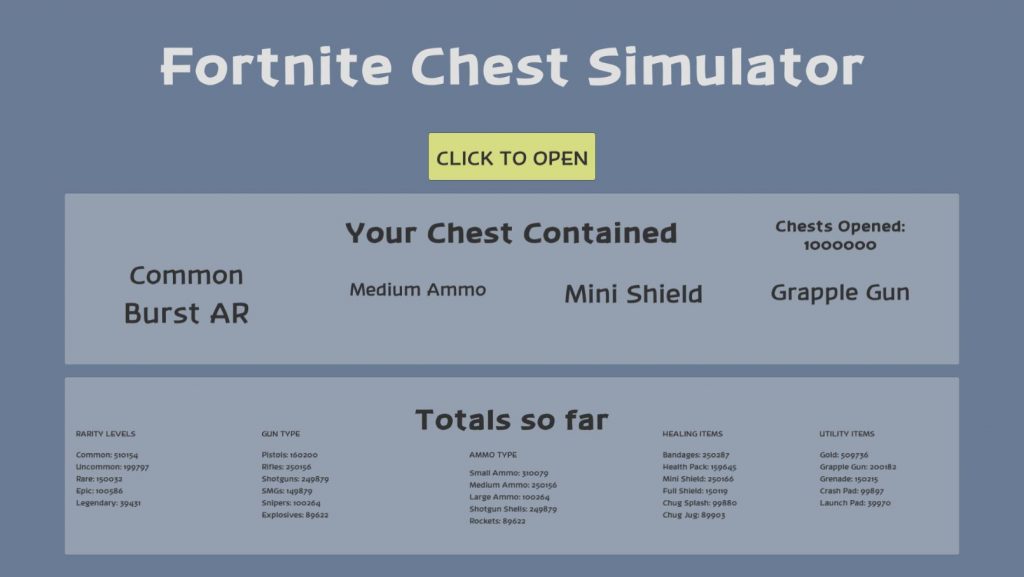
So all in all I had the mathematics working to a point that I was happy with. I did realise it was not a 100% exact recreation of the Fortnite mechanic because there are certain weapon groups that are not always available at every weapon rarity, for example you cannot get an uncommon Grenade Launcher, so I know there are improvements to be made in there. Obviously the major improvement would be to actually have the design written down for you and not have to try and reverse engineer it, but still I think I have made a pretty good and close recreation.
Below is the final script for the game and you can try out a version of it by following this link https://defconsoft.itch.io/fortnite-chest-simulator-1
|
1 2 3 4 5 6 7 8 9 10 11 12 13 14 15 16 17 18 19 20 21 22 23 24 25 26 27 28 29 30 31 32 33 34 35 36 37 38 39 40 41 42 43 44 45 46 47 48 49 50 51 52 53 54 55 56 57 58 59 60 61 62 63 64 65 66 67 68 69 70 71 72 73 74 75 76 77 78 79 80 81 82 83 84 85 86 87 88 89 90 91 92 93 94 95 96 97 98 99 100 101 102 103 104 105 106 107 108 109 110 111 112 113 114 115 116 117 118 119 120 121 122 123 124 125 126 127 128 129 130 131 132 133 134 135 136 137 138 139 140 141 142 143 144 145 146 147 148 149 150 151 152 153 154 155 156 157 158 159 160 161 162 163 164 165 166 167 168 169 170 171 172 173 174 175 176 177 178 179 180 181 182 183 184 185 186 187 188 189 190 191 192 193 194 195 196 197 198 199 200 201 202 203 204 205 206 207 208 209 210 211 212 213 214 215 216 217 218 219 220 221 222 223 224 225 226 227 228 229 230 231 232 233 234 235 236 237 238 239 240 241 242 243 244 245 246 247 248 249 250 251 252 253 254 255 256 257 258 259 260 261 262 263 264 265 266 267 268 269 270 271 272 273 274 275 276 277 278 279 280 281 282 283 284 285 286 287 288 289 290 291 292 293 294 295 296 297 298 299 300 301 302 303 |
using System.Collections; using System.Collections.Generic; using UnityEngine; using UnityEngine.UI; public class ChestManager : MonoBehaviour { [Header("Rarity")] public string s_Rarity; public int i_Rarity; [Header("Weapon Group")] public string s_WeaponGroup; public int i_WeaponGroup; [Header("Weapon Choice")] // 0 = Small, 1 = Medium, 2 = Shotgun Shells, 3 = Large, 4 = Rockets public string s_WeaponChoice; public int i_WeaponChoice; [Header("Ammo Type")] public string s_Ammotype; public int i_AmmoType; [Header("Healing Item")] public string s_HealingItem; public int i_HealingItem; [Header("Utility Item")] public string s_UtilityItem; public int i_UtilityItem; [Header("Weapon Arrays")] public string[] Pistols; public string[] Rifles; public string[] Shotguns; public string[] SMGs; public string[] Snipers; public string[] Explosives; [Header("UX Stuff")] public Text ChestsOpened; public Text CurrentRarity, CurrentWeapon, CurrentAmmo, CurrentHealth, CurrentUtility; public Text CommonTotal, UncommonTotal, RareTotal, EpicTotal, LegendaryTotal, PistolsTotal, RiflesTotal, ShotgunsTotal, SMGTotal, SniperTotal, ExplosiveTotal, SmallTotal, MediumTotal, LargeTotal, ShotgunShellTotal, RocketsTotal, BandagesTotal, HealthPackTotal, MiniTotal, FullPotTotal, ChugSplashTotal, ChugJugTotal, GoldTotal, GrappleTotal, GrenadeTotal, CrashPadTotal, LaunchpadTotal; private int i_ChestsOpened, i_CommonTotal, i_UncommonTotal, i_RareTotal, i_EpicTotal, i_LegendaryTotal, i_PistolsTotal, i_RiflesTotal, i_ShotgunsTotal, i_SMGTotal, i_SniperTotal, i_ExplosiveTotal, i_SmallTotal, i_MediumTotal, i_LargeTotal, i_ShotgunShellTotal, i_RocketsTotal, i_BandagesTotal, i_HealthPackTotal, i_MiniTotal, i_FullPotTotal, i_ChugSplashTotal, i_ChugJugTotal, i_GoldTotal, i_GrappleTotal, i_GrenadeTotal, i_CrashPadTotal, i_LaunchpadTotal; void Start() { //DEBUG CODE FOR OPENING CHESTS //for (int i = 0; i < 1000000; i++) { // Invoke("PressButton", 0.1f); //} } // Update is called once per frame void Update() { //Update the UI ChestsOpened.text = "Chests Opened: " + i_ChestsOpened.ToString(); CurrentRarity.text = s_Rarity; CurrentWeapon.text = s_WeaponChoice; CurrentAmmo.text = s_Ammotype; CurrentHealth.text = s_HealingItem; CurrentUtility.text = s_UtilityItem; CommonTotal.text = "Common: " + i_CommonTotal.ToString(); UncommonTotal.text = "Uncommon: " + i_UncommonTotal.ToString(); RareTotal.text = "Rare: " + i_RareTotal.ToString(); EpicTotal.text = "Epic: " + i_EpicTotal.ToString(); LegendaryTotal.text = "Legendary: " + i_LegendaryTotal.ToString(); PistolsTotal.text = "Pistols: " + i_PistolsTotal.ToString(); RiflesTotal.text = "Rifles: " + i_RiflesTotal.ToString(); ShotgunsTotal.text = "Shotguns: " + i_ShotgunsTotal.ToString(); SMGTotal.text = "SMGs: " + i_SMGTotal.ToString(); SniperTotal.text = "Snipers: " + i_SniperTotal.ToString(); ExplosiveTotal.text = "Explosives: " + i_ExplosiveTotal.ToString(); SmallTotal.text = "Small Ammo: " + i_SmallTotal.ToString(); MediumTotal.text = "Medium Ammo: " + i_MediumTotal.ToString(); LargeTotal.text = "Large Ammo: " + i_LargeTotal.ToString(); ShotgunShellTotal.text = "Shotgun Shells: " + i_ShotgunShellTotal.ToString(); RocketsTotal.text = "Rockets: " + i_RocketsTotal.ToString(); BandagesTotal.text = "Bandages: " + i_BandagesTotal.ToString(); HealthPackTotal.text = "Health Pack: " + i_HealthPackTotal.ToString(); MiniTotal.text = "Mini Shield: " + i_MiniTotal.ToString(); FullPotTotal.text = "Full Shield: " + i_FullPotTotal.ToString(); ChugSplashTotal.text = "Chug Splash: " + i_ChugSplashTotal.ToString(); ChugJugTotal.text = "Chug Jug: " + i_ChugJugTotal.ToString(); GoldTotal.text = "Gold: " + i_GoldTotal.ToString(); GrappleTotal.text = "Grapple Gun: " + i_GrappleTotal.ToString(); GrenadeTotal.text = "Grenade: " + i_GrenadeTotal.ToString(); CrashPadTotal.text = "Crash Pad: " + i_CrashPadTotal.ToString(); LaunchpadTotal.text = "Launch Pad: " + i_LaunchpadTotal.ToString(); } IEnumerator GenerateAll() { GenerateRarity(); GenerateWeaponTypeGroup(); GenerateWeaponChoice(); GenerateHealing(); Generateutility(); yield return new WaitForEndOfFrame (); } public void PressButton() { StartCoroutine(GenerateAll()); i_ChestsOpened++; } void GenerateRarity () { //Rarities = 0 - Common 50%, 1 - Uncommon 20%, 2 - Rare 15 %, 3 - Epic 10%, 4 - Legendary 5% float tempRarity = Random.Range(0, 100); if (tempRarity <= 50){ i_Rarity = 0; s_Rarity = "Common"; i_CommonTotal++; } else if (tempRarity > 50 && tempRarity <= 70) { i_Rarity = 1; s_Rarity = "Uncommon"; i_UncommonTotal++; } else if (tempRarity > 70 && tempRarity <= 85) { i_Rarity = 2; s_Rarity = "Rare"; i_RareTotal++; } else if (tempRarity > 85 && tempRarity <= 95) { i_Rarity = 3; s_Rarity = "Epic"; i_EpicTotal++; } else { i_Rarity = 4; s_Rarity = "Legendary"; i_LegendaryTotal++; } } void GenerateWeaponTypeGroup() { //Weapon Groups = 0 - Pistols 15%, 1 - Rifles 25%, 2 - Shotguns 25%, 3 - SMGs 15%, 4 - Snipers 10%, 5 - Explosives 10% float tempWeaponGroup = Random.Range(0, 100); if (tempWeaponGroup <= 15){ i_WeaponGroup = 0; s_WeaponGroup = "Pistols"; i_AmmoType = 0; s_Ammotype = "Small Ammo"; i_PistolsTotal++; i_SmallTotal++; } else if (tempWeaponGroup > 15 && tempWeaponGroup <= 40) { i_WeaponGroup = 1; s_WeaponGroup = "Rifles"; i_AmmoType = 1; s_Ammotype = "Medium Ammo"; i_RiflesTotal++; i_MediumTotal++; } else if (tempWeaponGroup > 40 && tempWeaponGroup <= 65) { i_WeaponGroup = 2; s_WeaponGroup = "Shotguns"; i_AmmoType = 2; s_Ammotype = "Shotgun Shells"; i_ShotgunsTotal++; i_ShotgunShellTotal++; } else if (tempWeaponGroup > 65 && tempWeaponGroup <= 80) { i_WeaponGroup = 3; s_WeaponGroup = "SMGs"; i_AmmoType = 0; s_Ammotype = "Small Ammo"; i_SMGTotal++; i_SmallTotal++; } else if (tempWeaponGroup > 80 && tempWeaponGroup <= 90) { i_WeaponGroup = 4; s_WeaponGroup = "Snipers"; i_AmmoType = 3; s_Ammotype = "Large Ammo"; i_SniperTotal++; i_LargeTotal++; } else { i_WeaponGroup = 5; s_WeaponGroup = "Explosives"; i_AmmoType = 4; s_Ammotype = "Rockets"; i_ExplosiveTotal++; i_RocketsTotal++; } } void GenerateWeaponChoice() { int tempWeaponChoice; //Switch statement that utilises the weapon group to decide which array to use and then randomly generate a choice from this array. switch (i_WeaponGroup){ case 0: tempWeaponChoice = Random.Range (0, Pistols.Length); i_WeaponChoice = tempWeaponChoice; s_WeaponChoice = Pistols[tempWeaponChoice]; break; case 1: tempWeaponChoice = Random.Range (0, Rifles.Length); i_WeaponChoice = tempWeaponChoice; s_WeaponChoice = Rifles[tempWeaponChoice]; break; case 2: tempWeaponChoice = Random.Range (0, Shotguns.Length); i_WeaponChoice = tempWeaponChoice; s_WeaponChoice = Shotguns[tempWeaponChoice]; break; case 3: tempWeaponChoice = Random.Range (0, SMGs.Length); i_WeaponChoice = tempWeaponChoice; s_WeaponChoice = SMGs[tempWeaponChoice]; break; case 4: tempWeaponChoice = Random.Range (0, Snipers.Length); i_WeaponChoice = tempWeaponChoice; s_WeaponChoice = Snipers[tempWeaponChoice]; break; case 5: tempWeaponChoice = Random.Range (0, Explosives.Length); i_WeaponChoice = tempWeaponChoice; s_WeaponChoice = Explosives[tempWeaponChoice]; break; } } void GenerateHealing() { //Healing Items = 0 - Health Pack 15%, 1 - Bandages 25%, 2 - Mini Sheild 25%, 3 - Full Shield 15%, 4 - Chug Splash 10%, 5 - Chug Jug 10% float tempHealingItem = Random.Range(0, 100); if (tempHealingItem <= 15){ i_HealingItem = 0; s_HealingItem = "Health Pack"; i_HealthPackTotal++; } else if (tempHealingItem > 15 && tempHealingItem <= 40) { i_HealingItem = 1; s_HealingItem = "Bandages"; i_BandagesTotal++; } else if (tempHealingItem > 40 && tempHealingItem <= 65) { i_HealingItem = 2; s_HealingItem = "Mini Shield"; i_MiniTotal++; } else if (tempHealingItem > 65 && tempHealingItem <= 80) { i_HealingItem = 3; s_HealingItem = "Full Shield"; i_FullPotTotal++; } else if (tempHealingItem > 80 && tempHealingItem <= 90) { i_HealingItem = 4; s_HealingItem = "Chug Splash"; i_ChugSplashTotal++; } else { i_HealingItem = 5; s_HealingItem = "Chug Jug"; i_ChugJugTotal++; } } void Generateutility () { //Utils = 0 - Gold 50%, 1 - Grapple Gun 20%, 2 - Grenades 15 %, 3 - Crash Pads 10%, 4 - Launchpad 5% float tempUtility = Random.Range(0, 100); if (tempUtility <= 50){ i_UtilityItem = 0; s_UtilityItem = "Gold"; i_GoldTotal++; } else if (tempUtility > 50 && tempUtility <= 70) { i_UtilityItem = 1; s_UtilityItem = "Grapple Gun"; i_GrappleTotal++; } else if (tempUtility > 70 && tempUtility <= 85) { i_UtilityItem = 2; s_UtilityItem = "Grenades"; i_GrenadeTotal++; } else if (tempUtility > 85 && tempUtility <= 95) { i_UtilityItem = 3; s_UtilityItem = "Crash Pads"; i_CrashPadTotal++; } else { i_UtilityItem = 4; s_UtilityItem = "Launchpad"; i_LaunchpadTotal++; } } } |
I will be detailing how I went about the aesthetic side of this prototype in my next post.
References
Dey, D., 2021. Fortnite data miner reveals how chest loot pool works in Chapter 2 Season 5. [online] Sportskeeda.com. Available at: <https://www.sportskeeda.com/esports/fortnite-data-miner-reveals-chest-loot-pool-works-chapter-2-season-5> [Accessed 14 June 2021].
HYPEX, 2021. [Twitter] 27th February. Available at: <https://twitter.com/HYPEX/status/1365778033773281283> [Accessed 14th June 2021].
Stack Overflow. 2021. How to generate a random weighted distribution of elements. [online] Available at: <https://stackoverflow.com/questions/30203362/how-to-generate-a-random-weighted-distribution-of-elements> [Accessed 14 June 2021].
Groote, T., 2017. C# weighted random numbers. [online] Stack Overflow. Available at: <https://stackoverflow.com/questions/46563490/c-sharp-weighted-random-numbers> [Accessed 14 June 2021].
Figures
Feature Image: FortniteIntel, 2019. Fortnite chest graphic. [image] Available at: <https://fortniteintel.com/wp-content/uploads/2019/03/chest.jpg> [Accessed 19 June 2021].
Figure 1: Charlish, R (2021) ‘Fortnite chest opening animation’ Created on 19th June 2021
Figure 2: Charlish, R (2021) ‘Idea Generation Images’ Created on 19th June 2021
Figure 3: Charlish, R (2021) ‘Chest Manager inspector window’ Created on 19th June 2021
Figure 4: Charlish, R (2021) ‘Chest content generator’ Created on 19th June 2021




0 Comments