Well a little later than planned, mostly down to some manipulation in the planning to better help the work of my day job, but this is the second dev log in the development of Draak & Draig. Even with the set backs of a very busy run in to Christmas within my work life we have still managed to stay relatively on track with the work and produce a build ready for testing. Thankfully I was able to use some time before the festivities to really hammer down the mechanics for the game and get everything into a playable state for testing.
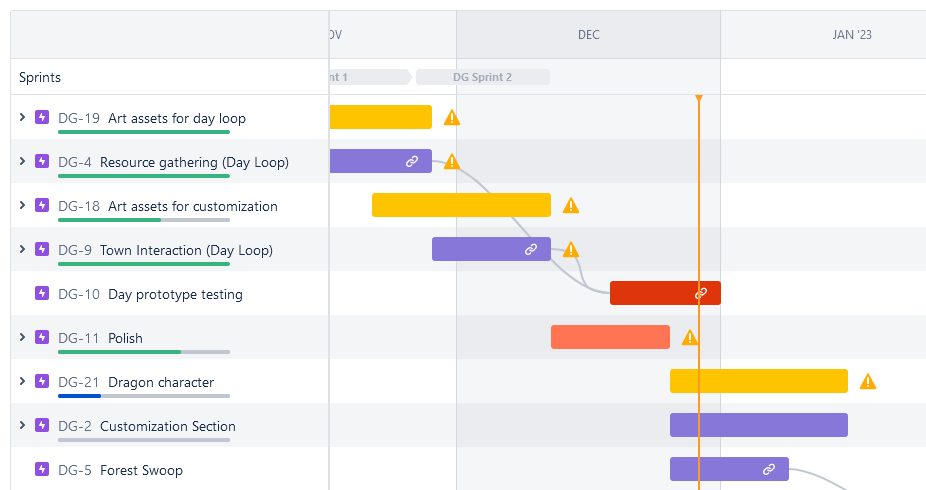
The Game
So the current state of the game is the the day loop is now in the game, the player can move around, interact with resource objects and NPC’s and is limited by the day time timer. All the required assets are in the game, including the user experience as well as some sound work. This has been completed by both Anouk and myself, with Anouk taking on a lot of the grunt work of laying out the levels and environments to allow me to concentrate on getting the mechanics working.
You can download the build from our itch.io page.
Player Controller
The Player Controller script has evolved at a good rate to fit with the different mechanics and aspects of the game. The major change is the introduction of the interaction mechanics and how the player controller handles this as the player needs to not move while interacting and have the mouse cursor returned so that they can actually perform the interaction. This was easily solved using an bool to place the player into an interacting state and then manipulating the movement code to stop them being able to move at this point. The interaction scripts then return the bool to false once they are completed.
There was also a need to add in a few new controls to fit with rhe new mechanics. A jump was added along with a mouse click listener to allow the player to click the interaction power bars. Thankfully with the new input system this is a simple task of adding in the button to the control scheme and then calling it through the Player Controls scripts. You can then just use a simple function to notify any scripts that the action was performed.
The finally major addition was to how the Player Controller works with the camera system. The camera moves with the mouse (as detailed in Dev Log 1) and it would always do this regardless if they player was actually allowed to move. What this meant was that the camera system would break when you entered and exited an interaction mechanic as the camera would continue to move with the mouse movements even though this was not reflected in the game (as you were actually in another camera the time). After some arguing with the code it was a simple solve by writing two new methods that switch a boolean that could be checked to allow the camera to move.
The current script is below.
|
1 2 3 4 5 6 7 8 9 10 11 12 13 14 15 16 17 18 19 20 21 22 23 24 25 26 27 28 29 30 31 32 33 34 35 36 37 38 39 40 41 42 43 44 45 46 47 48 49 50 51 52 53 54 55 56 57 58 59 60 61 62 63 64 65 66 67 68 69 70 71 72 73 74 75 76 77 78 79 80 81 82 83 84 85 86 87 88 89 90 91 92 93 94 95 96 97 98 99 100 101 102 103 104 105 106 107 108 109 110 111 112 113 114 115 116 117 118 119 120 121 122 123 124 125 126 127 128 129 130 131 132 133 134 135 136 137 138 139 140 141 142 143 144 145 146 147 148 149 150 151 152 153 154 155 156 157 158 159 160 161 162 163 164 165 166 167 168 169 170 171 172 173 174 175 176 177 178 179 180 181 182 183 184 185 186 187 188 189 190 191 192 193 194 195 196 197 198 199 200 201 202 203 204 205 206 207 208 209 210 211 212 213 214 215 216 217 218 219 220 221 222 223 224 225 |
using System.Collections; using System.Collections.Generic; using UnityEngine; using Cinemachine; using DG.Tweening; [RequireComponent(typeof(CharacterController))] public class PlayerController : MonoBehaviour { [Header ("PlayerAttributes")] [SerializeField] private bool groundedPlayer; [SerializeField] private float playerSpeed = 2.0f; [SerializeField] private float jumpHeight = 1.0f; [SerializeField] private float gravityValue = -9.81f; [Header ("StateInteracting")] public bool Interacting; public bool stateInteract; public bool isTree; public bool stopFollowing; public bool nextScene; public int SceneToLoad; public Transform interactingObject; public GameObject exitTrigger; private bool inNPC; private Quaternion rot; public GameObject arms; private CharacterController controller; private GameManager gameManager; private UXManager uXManager; private Vector3 playerVelocity; private InputManager inputManager; private Transform cameraTransform; [Header ("Cameras")] public CinemachineVirtualCamera FirstPersonCam; public CinemachineVirtualCamera InteractCam; public Transform followObject; public Transform stopFollowObject; [Header ("footstep Audio")] [Range(0f, 1f)] public float audioClipVolume = 0.1f; //Range of random volume deviation used for footsteps; //Footstep audio clips will be played at different volumes for a more "natural sounding" result; public float relativeRandomizedVolumeRange = 0.2f; public AudioClip[] footStepClips; //Footsteps will be played every time the traveled distance reaches this value public float footstepDistance = 1f; float currentFootstepDistance = 0f; public AudioSource audioSource; private void Start() { controller = GetComponent<CharacterController>(); inputManager = InputManager.Instance; cameraTransform = Camera.main.transform; gameManager = GameObject.Find("GameManager").GetComponent<GameManager>(); uXManager = GameObject.Find("GameManager").GetComponent<UXManager>(); //Grabs the variables from the Game Manager playerSpeed = gameManager.playerSpeed; jumpHeight = gameManager.jumpHeight; gravityValue = gameManager.gravityValue; } void Update() { //Move Player if not interacting if (!Interacting){ Cursor.visible = false; Cursor.lockState = CursorLockMode.Locked; groundedPlayer = controller.isGrounded; if (groundedPlayer && playerVelocity.y < 0) { playerVelocity.y = 0f; } Vector2 movement = inputManager.GetPlayerMovement(); Vector3 move = new Vector3 (movement.x, 0f, movement.y); move = cameraTransform.forward * move.z + cameraTransform.right * move.x; move.y = 0f; controller.Move(move * Time.deltaTime * playerSpeed); if (move.magnitude > 0) { currentFootstepDistance += Time.deltaTime * playerSpeed; //Play foot step audio clip if a certain distance has been traveled; if(currentFootstepDistance > footstepDistance) { //Only play footstep sound if mover is grounded if(groundedPlayer) { PlayFootstepSound(); } currentFootstepDistance = 0f; } } // Changes the height position of the player.. if (inputManager.PlayerJumpedThisFrame() && groundedPlayer) { playerVelocity.y += Mathf.Sqrt(jumpHeight * -3.0f * gravityValue); } if (inputManager.PlayerInteractThisFrame()) { if (stateInteract){ Interacting = true; stopFollowObject.position = followObject.position; stopFollowObject.rotation = followObject.rotation; FirstPersonCam.m_Follow = stopFollowObject; //Set the interact camera angle interactingObject.gameObject.GetComponent<Interactable>().itemCanvas.DOFade(0,1f); Vector3 lookPos; /*if (isTree) { lookPos = new Vector3 (interactingObject.position.x, interactingObject.position.y + 2f, interactingObject.position.z) - cameraTransform.position; } else {*/ lookPos = interactingObject.position - cameraTransform.position; //} rot = Quaternion.LookRotation(lookPos); //Quaternion rot = Quaternion.Euler (0f, cameraTransform.eulerAngles.y, 0f); InteractCam.ForceCameraPosition(cameraTransform.position, rot); //Switch the cameras FirstPersonCam.m_Priority = 0; InteractCam.m_Priority = 10; arms.SetActive(true); StartCoroutine(StopFollow()); if (interactingObject.gameObject.GetComponent<Interactable>().isNPC) { Cursor.lockState = CursorLockMode.None; Cursor.visible = true; inNPC = true; interactingObject.gameObject.GetComponent<InteractableNPCManager>().TurnToPlayer(transform); interactingObject.gameObject.GetComponent<InteractableNPCManager>().StartConversation(); } else { inNPC = false; interactingObject.GetChild(2).GetComponent<InteractableGameManager>().StartTheGame(); } } else if (nextScene){ Destroy(exitTrigger); uXManager.LoadScene(SceneToLoad); } } playerVelocity.y += gravityValue * Time.deltaTime; controller.Move(playerVelocity * Time.deltaTime); } if (inputManager.PlayerClickedThisFrame()) { if (!inNPC){ if (interactingObject != null){ if (interactingObject.GetChild(2).GetComponent<InteractableGameManager>().InteractableState == 1){ interactingObject.GetChild(2).GetComponent<InteractableGameManager>().KillTheAimTween(); } else if (interactingObject.GetChild(2).GetComponent<InteractableGameManager>().InteractableState == 2) { interactingObject.GetChild(2).GetComponent<InteractableGameManager>().KillThePowerTween(); //Endinteracting(); } else { return; } } } } } public void Endinteracting(){ Interacting = false; //Switch the cameras Quaternion rot = Quaternion.Euler (cameraTransform.eulerAngles.x, cameraTransform.eulerAngles.y, cameraTransform.eulerAngles.z); FirstPersonCam.ForceCameraPosition(cameraTransform.position, rot); FirstPersonCam.m_Priority = 10; InteractCam.m_Priority = 0; arms.SetActive(false); StartCoroutine(StartFollow()); } public IEnumerator StopFollow(){ yield return new WaitForSeconds(1f); stopFollowing = true; yield return new WaitForEndOfFrame(); } public IEnumerator StartFollow(){ FirstPersonCam.m_Follow = followObject; stopFollowing = false; yield return new WaitForSeconds (cameraTransform.GetComponent<CinemachineBrain>().m_DefaultBlend.m_Time); } void PlayFootstepSound() { int _footStepClipIndex = Random.Range(0, footStepClips.Length); audioSource.PlayOneShot(footStepClips[_footStepClipIndex], audioClipVolume + audioClipVolume * Random.Range(-relativeRandomizedVolumeRange, relativeRandomizedVolumeRange)); } } |
The Game Flow
The next major part of the game to implement was the game flow and how the game manages the different objects and variables across levels. I wanted to make sure that both of us could develop content without having to wait for the release of files or scenes within Unity so adopted a prefab based approach to the development in order to make sure that this was possible.
First the day time environment was prefabs out which allowed Anouk to develop this completely independently of the scenes that it was in. As this environemnt will be used in most of the scenes this was a major change in the way we developed content for the game.
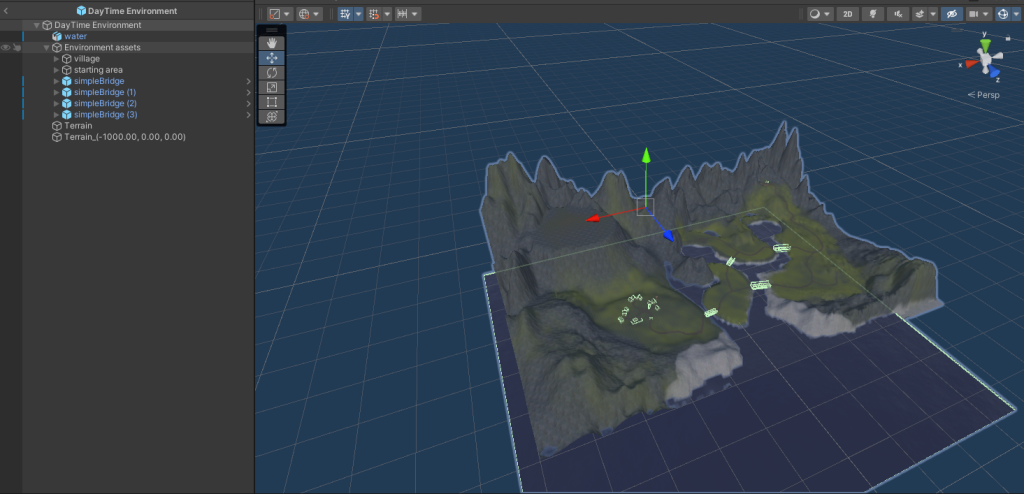
The next thing was to provide an object that would move between scenes that we could store all of the important game based information. This was done through a Game Manager script that does not destroy itself inbetween level loads, lives persistently in game and will only allow itself to be created once through the use of a Singleton.
A Singleton, as described by French (2021) is “…a globally accessible class that exists in the scene, but only once.” By using this on a script you can create a game object that will never create itself again if it finds an instance of itself in the game already. So I created the Game Manager script below and added it to an empty game object in the first scene that we use (the Main Menu scene). I added the DontDestroyOnLoad function to this script within the Singleton code so that it not only will not create itself again but will live persistently in the game even between level loads.
|
1 2 3 4 5 6 7 8 9 10 11 12 13 14 15 16 17 18 19 20 21 22 23 24 25 26 27 28 29 30 31 32 33 34 35 36 37 38 |
using System; using UnityEngine; public class GameManager : MonoBehaviour { public static GameManager instance; [Header ("Timer Stuff")] public float DaytimeTimerAmount; [Header ("Movement Stuff")] public float playerSpeed = 2.0f; public float jumpHeight = 1.0f; public float gravityValue = -9.81f; [Header ("Resources stuff")] public int baseResourceAmount; public int totalWood; public int totalRock; public int totalFish; void Awake() { if (instance != null && instance != this) Destroy(this.gameObject); else { instance = this; } DontDestroyOnLoad(this.gameObject); } } |
So with this implemented we were free to set up our level structure through various scenes and know we would be able to reference information from the different scenes by storing them in the Game Manager script.
Additionally we were able to add the UX Manager script to this object and store all of the Unity Canvas objects within it, meaning we are able to pull any aspect of the user interface up whenever we want.
User Experience
When it comes to the user experience there was a lot of work done across the game. All aspects of the daytime UX were added along with the script to control it. As previously stated this lives within the Game Manager object so that we can turn elements of the user experience on and off as we need them, and use them across different scenes. It is primarily run off several different canvas objects as this is considered best practice by Unity themselves. It also allows us to control elements a lot easier without the need to turn off large amounts of different elements.
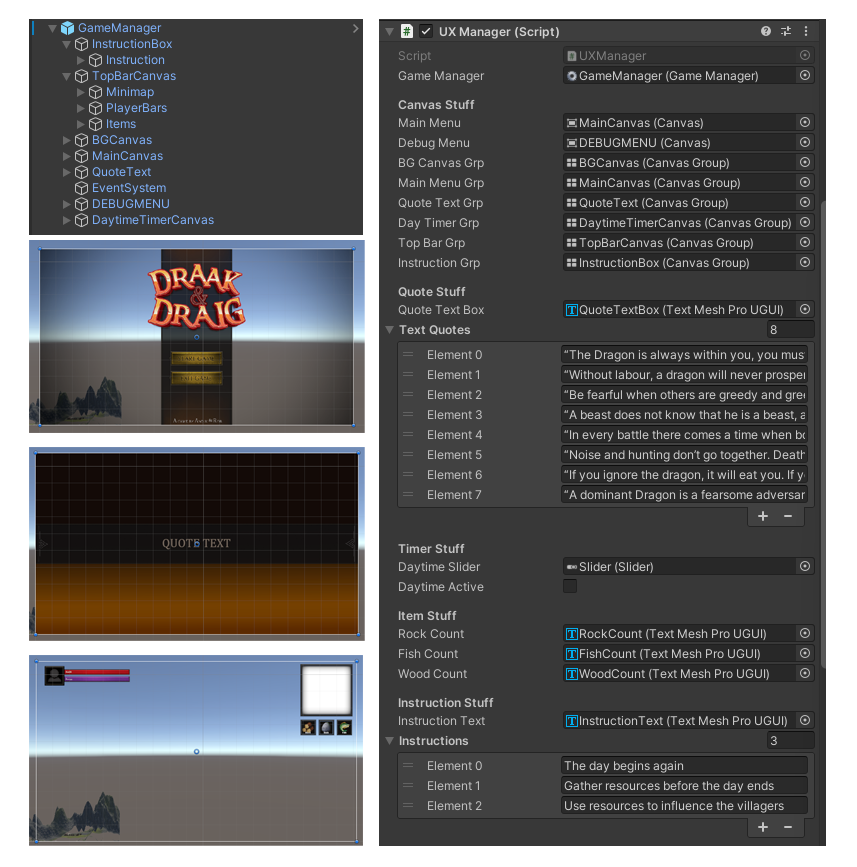
As you can see in the image above the UX script is quite detailed in what it is trying to achieve allowing for full customisation of different aspects of the user experience without the need for lots of different objects. It also heavily relies on text based elements to allow for localisation at a later date if required and can be called at anytime to manipulate UX elements as it is included within the singleton nature of the Game Manager.
The script itself is below.
|
1 2 3 4 5 6 7 8 9 10 11 12 13 14 15 16 17 18 19 20 21 22 23 24 25 26 27 28 29 30 31 32 33 34 35 36 37 38 39 40 41 42 43 44 45 46 47 48 49 50 51 52 53 54 55 56 57 58 59 60 61 62 63 64 65 66 67 68 69 70 71 72 73 74 75 76 77 78 79 80 81 82 83 84 85 86 87 88 89 90 91 92 93 94 95 96 97 98 99 100 101 102 103 104 105 106 107 108 109 110 111 112 113 114 115 116 117 118 119 120 121 122 123 124 125 126 127 128 129 130 131 132 133 134 135 136 137 138 139 140 141 142 143 144 145 146 147 148 149 150 151 152 153 154 155 156 157 158 159 160 161 162 163 164 165 166 167 168 169 170 171 172 173 174 175 176 177 178 179 180 181 182 183 184 185 186 187 188 189 190 191 192 193 194 195 196 197 198 199 200 201 202 203 |
using System.Collections; using System.Collections.Generic; using UnityEngine; using UnityEngine.SceneManagement; using UnityEngine.InputSystem; using UnityEngine.UI; using DG.Tweening; public class UXManager : MonoBehaviour { public GameManager gameManager; [Header ("Canvas Stuff")] [SerializeField] private Canvas MainMenu; [SerializeField] private Canvas DebugMenu; [SerializeField] private CanvasGroup BGCanvasGrp; [SerializeField] private CanvasGroup MainMenuGrp; [SerializeField] private CanvasGroup QuoteTextGrp; [SerializeField] private CanvasGroup DayTimerGrp; [SerializeField] private CanvasGroup TopBarGrp; [SerializeField] private CanvasGroup InstructionGrp; [Header ("Quote Stuff")] [SerializeField] private TMPro.TMP_Text QuoteTextBox; public string[] TextQuotes; [Header ("Timer Stuff")] public Slider daytimeSlider; private bool loadResourceLevelOnce; public bool daytimeActive; private bool dayComplete; [Header ("Item Stuff")] public TMPro.TMP_Text RockCount; public TMPro.TMP_Text FishCount; public TMPro.TMP_Text WoodCount; [Header ("Instruction Stuff")] public TMPro.TMP_Text instructionText; public string[] instructions; private void Awake() { } private void Start() { RockCount.text = "Rock: " + gameManager.totalRock; FishCount.text = "Fish: " + gameManager.totalFish; WoodCount.text = "Wood: " + gameManager.totalWood; } ////////////////////////////////////// // USE TO LOAD SCENES ////////////////////////////////////// public void LoadScene(int SceneNo){ StartCoroutine("LoadYourAsyncScene", SceneNo); } public IEnumerator LoadYourAsyncScene (int SceneNo) { var scene = SceneManager.LoadSceneAsync (SceneNo); scene.allowSceneActivation = false; // Wait until the asynchronous scene fully loads FadeInCanvasGrp(BGCanvasGrp, 2f); SetQuoteText(SceneNo); if (SceneNo == 1){ FadeOutCanvasGrp(MainMenuGrp, 2f); } else if (SceneNo == 2 && !loadResourceLevelOnce) { loadResourceLevelOnce = true; } yield return new WaitForSeconds (3f); scene.allowSceneActivation = true; //Loads the scene in FadeInCanvasGrp (QuoteTextGrp, 3f); yield return new WaitForSeconds (3f); FadeOutCanvasGrp(QuoteTextGrp, 2f); yield return new WaitForSeconds (2f); FadeOutCanvasGrp(BGCanvasGrp, 2f); FadeInCanvasGrp(TopBarGrp, 2f); FadeInCanvasGrp(InstructionGrp, 2f); if (loadResourceLevelOnce && !daytimeActive) { FadeInCanvasGrp (DayTimerGrp, 3f); StartDaytime(); } else if (loadResourceLevelOnce && daytimeActive) { FadeOutCanvasGrp (DayTimerGrp, 0.1f); } yield return new WaitForSeconds (5f); FadeOutCanvasGrp(InstructionGrp, 5f); } ////////////////////////////////////// // USE TO FADE CANVAS GROUPS ////////////////////////////////////// private void SetQuoteText(int SceneNo) { switch (SceneNo) { case 0: //Main break; case 1: //Move to openingscene QuoteTextBox.text = TextQuotes[0]; instructionText.text = instructions[0]; break; case 2: //Move to resource gathering QuoteTextBox.text = TextQuotes[1]; instructionText.text = instructions[1]; break; case 3: //Move to village QuoteTextBox.text = TextQuotes[2]; instructionText.text = instructions[2]; break; } } private void FadeOutCanvasGrp(CanvasGroup current, float fadeTime){ current.DOFade (0, fadeTime); } private void FadeInCanvasGrp(CanvasGroup current, float fadeTime){ current.DOFade (1f, fadeTime); } ////////////////////////////////////// // DEBUG MENU ////////////////////////////////////// private void Update() { Keyboard kboard = Keyboard.current; if (kboard.mKey.wasPressedThisFrame) { if (DebugMenu.isActiveAndEnabled == true) { DebugMenu.enabled = false; } else { DebugMenu.enabled = true; } } if (daytimeActive) { daytimeSlider.value += Time.deltaTime; } if (daytimeActive == true && daytimeSlider.value >= daytimeSlider.maxValue && !dayComplete) { dayComplete = true; FadeOutCanvasGrp (DayTimerGrp, 1f); StartCoroutine(LoadYourAsyncScene (3)); } } public void LoadDebugLevel (int debugLevel) { DebugMenu.enabled = false; SceneManager.LoadScene (debugLevel); FadeOutCanvasGrp(MainMenuGrp, 2f); FadeOutCanvasGrp(BGCanvasGrp, 2f); FadeInCanvasGrp(TopBarGrp, 2f); } public void StartDaytime() { daytimeSlider.maxValue = gameManager.DaytimeTimerAmount; daytimeActive = true; } public void QuitGame() { Application.Quit(); } public void SetItemAmounts() { RockCount.text = "Rock: " + gameManager.totalRock; FishCount.text = "Fish: " + gameManager.totalFish; WoodCount.text = "Wood: " + gameManager.totalWood; } } |
The Interaction Mechanic
The final major part of the game that needed to be added was the interaction mechanics, of which there are two types, resources and NPC’s. The difference between the two interaction types are the mechanics that are loaded in once the player interacts with them however all interactables are driven through a single script.
|
1 2 3 4 5 6 7 8 9 10 11 12 13 14 15 16 17 18 19 20 21 22 23 24 25 26 27 28 29 30 31 32 33 34 35 36 37 38 39 40 41 42 43 44 45 46 47 48 49 50 51 52 53 54 55 56 57 58 59 60 61 62 63 64 65 66 67 68 69 70 71 72 73 74 75 76 77 78 79 80 81 82 83 84 85 86 87 88 |
using UnityEngine; using DG.Tweening; public class Interactable : MonoBehaviour { public enum InteractType { rock, tree, fish, NPC}; [Header("Object Attributes")] public float radius = 3.0f; private SphereCollider areaTrigger; public InteractType interactType; public bool isNPC; public Transform treeCameraPoint; public GameObject RockPrefab; public GameObject TreePrefab; public GameObject FishPrefab; [Header("UX stuff")] public CanvasGroup itemCanvas; private void Awake() { areaTrigger = gameObject.AddComponent<SphereCollider>(); areaTrigger.radius = radius; areaTrigger.isTrigger = true; } private void Start() { //Setup the item type if (interactType == InteractType.rock){ GameObject rockClone = Instantiate(RockPrefab, transform); } if (interactType == InteractType.tree){ GameObject treeClone = Instantiate(TreePrefab, transform); } if (interactType == InteractType.fish){ GameObject fishClone = Instantiate(FishPrefab, transform); } if (interactType == InteractType.NPC){ isNPC = true; } } //handles the actual interactivity private void OnTriggerEnter(Collider other) { if (other.tag == "Player") { itemCanvas.DOFade (1f,1f); other.GetComponent<PlayerController>().stateInteract = true; if (interactType == InteractType.tree) { other.GetComponent<PlayerController>().isTree = true; } else { other.GetComponent<PlayerController>().isTree = false; } other.GetComponent<PlayerController>().interactingObject = this.transform; } } private void OnTriggerExit(Collider other) { if (other.tag == "Player") { itemCanvas.DOFade (0f,1f); other.GetComponent<PlayerController>().stateInteract = false; } } //visualises the trigger in Editor void OnDrawGizmosSelected() { Gizmos.color = Color.yellow; Gizmos.DrawWireSphere (transform.position, radius); } } |
This initial script is added to a prefab within the engine that can then be placed wherever we want an interactable to exist. We can then choose the type of interactable that we wil be using from the enum list, this then decides what other scripts are run subsequently when the player interacts. We can also set which interactable type prefab is loaded in and control the UX for when a player approaches it to give an instruction to interact with the object.
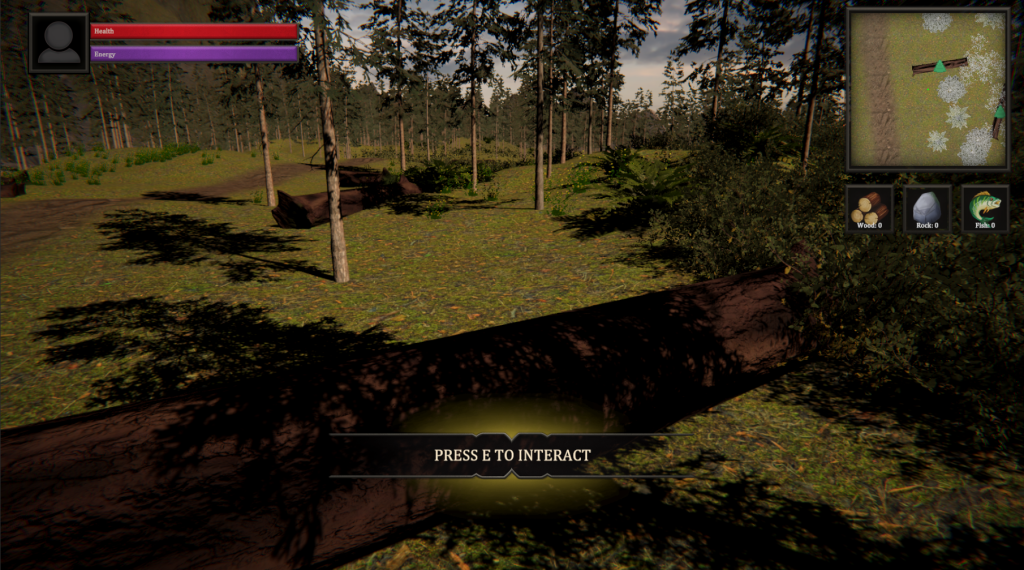
If an NPC is chosen this launches the InteractableNPCManager script along with the NPC prefab. This script contains all of the dialogue driven aspects of the interaction along with showing these on screen with the canvas elements within the prefab. The prefab itself also contains all of the different NPC models so we can change the NPC at will if we require.
|
1 2 3 4 5 6 7 8 9 10 11 12 13 14 15 16 17 18 19 20 21 22 23 24 25 26 27 28 29 30 31 32 33 34 35 36 37 38 39 40 41 42 43 44 45 46 47 48 49 50 51 52 53 54 55 56 57 58 59 60 61 62 63 64 65 66 67 68 69 70 71 72 73 74 75 76 77 78 79 80 81 82 83 84 85 86 87 88 89 90 91 92 93 94 95 |
using UnityEngine; using DG.Tweening; public class InteractableNPCManager : MonoBehaviour { [Header("UX Objects")] public Canvas overallCanvas; public CanvasGroup narrativeCanvas; public TMPro.TMP_Text NPCName; public TMPro.TMP_Text Textbox; public TMPro.TMP_Text Outcome; public GameObject Yesbutton, Nobutton, Exitbutton; public int ConversationState; private Animator anim; [Header("Speech Stuff")] public string npcName; [TextArea(3,10)] public string outComeText; [TextArea(5,10)] public string[] Conversation; public void StartConversation() { NPCName.text = npcName; Outcome.text = outComeText; overallCanvas.enabled = true; narrativeCanvas.DOFade(1f,1f); Textbox.text = Conversation[0]; anim = GetComponentInChildren<Animator>(); anim.SetTrigger("Talk"); } private void Update() { switch (ConversationState){ case 0: //Start break; case 1: //Are you sure Textbox.text = Conversation[1]; anim.SetTrigger("Talk"); break; case 2: //SuccessExit Textbox.text = Conversation[2]; anim.SetTrigger("Talk"); Yesbutton.SetActive (false); Nobutton.SetActive (false); Exitbutton.SetActive (true); break; case 3: //FailExit Textbox.text = Conversation[3]; anim.SetTrigger("Talk"); Yesbutton.SetActive (false); Nobutton.SetActive (false); Exitbutton.SetActive (true); break; } } public void ButtonYes() { ConversationState++; } public void ButtonNo(){ ConversationState = 3; } public void ButtonExit(){ narrativeCanvas.DOFade(0,1f); GameObject.Find("Player").GetComponent<PlayerController>().Endinteracting(); overallCanvas.enabled = false; ConversationState = 0; } public void TurnToPlayer(Transform playerPos) { Vector3 relativePos = playerPos.position - transform.position; Quaternion rotation = Quaternion.LookRotation(relativePos, Vector3.up); transform.rotation = rotation; } } |

The resources interaction system works in a similar way it just launches a different script, the InterableGameManager, instead.
This script runs all of the different types of interaction games that are aligned ot the different resources. It also controls all of the animations and tools that are used by talking to scripts and animation controllers set up by Anouk. It is slowly becoming a sizable script but at this point it is complete so will not be growing anymore.
As you can see from the images it contains all of the different aspects required for the rock, tree and fishing mini games, it controls the user experience and reports back results to the Game Manager script.
|
1 2 3 4 5 6 7 8 9 10 11 12 13 14 15 16 17 18 19 20 21 22 23 24 25 26 27 28 29 30 31 32 33 34 35 36 37 38 39 40 41 42 43 44 45 46 47 48 49 50 51 52 53 54 55 56 57 58 59 60 61 62 63 64 65 66 67 68 69 70 71 72 73 74 75 76 77 78 79 80 81 82 83 84 85 86 87 88 89 90 91 92 93 94 95 96 97 98 99 100 101 102 103 104 105 106 107 108 109 110 111 112 113 114 115 116 117 118 119 120 121 122 123 124 125 126 127 128 129 130 131 132 133 134 135 136 137 138 139 140 141 142 143 144 145 146 147 148 149 150 151 152 153 154 155 156 157 158 159 160 161 162 163 164 165 166 167 168 169 170 171 172 173 174 175 176 177 178 179 180 181 182 183 184 185 186 187 188 189 190 191 192 193 194 195 196 197 198 199 200 201 202 203 204 205 206 207 208 209 210 211 212 213 214 215 216 217 218 219 220 221 222 223 224 225 226 227 228 229 230 231 232 233 234 235 236 237 238 239 240 241 242 243 244 245 246 247 248 249 250 251 252 253 254 255 256 257 258 259 260 261 262 263 264 265 266 267 268 269 270 271 272 273 274 275 276 277 278 279 280 281 282 283 284 285 286 287 288 289 290 291 292 293 294 295 296 297 298 299 300 301 302 303 304 305 306 307 308 309 310 311 312 313 314 315 316 317 318 319 320 321 322 323 324 325 326 327 328 329 330 331 332 333 334 335 336 337 338 339 340 341 342 343 344 345 346 347 348 349 350 351 352 353 354 355 356 357 358 359 360 361 362 363 364 365 366 367 368 369 370 371 372 373 374 375 376 377 378 379 380 381 382 383 384 385 386 387 388 389 390 391 392 393 394 395 396 397 398 399 400 401 402 403 404 405 406 407 408 409 410 411 412 413 414 415 416 417 418 419 420 421 422 423 424 425 426 427 428 429 430 431 432 433 434 435 436 437 438 439 440 441 442 443 444 445 446 447 448 449 450 451 452 453 454 455 456 457 458 459 460 461 462 463 464 465 466 467 468 469 470 471 472 473 |
using System.Collections; using UnityEngine; using UnityEngine.UI; using DG.Tweening; using DinoFracture; public class InteractableGameManager : MonoBehaviour { public enum GameType { rock, tree, fish}; private GameManager gameManager; private UXManager uXManager; private int baseAmount; private int addAmount; private float Bonus1, Bonus2; [Header ("UX Animation Stuff")] public float moveUp; [Header ("Interact Type Setup")] public GameType gameType; public GameObject [] RockModels; public GameObject [] TreeModels; public GameObject FishPool; [Header ("Game Tracking")] private int Choice; public int InteractableState = 0; public float slideTime = 1f; [Header ("Rock UX")] public Canvas rockAimCanvas; public CircleSlider rockAimSlider; public TMPro.TMP_Text rockAimReact; private Tween rockAimTween; public Canvas rockPowerCanvas; public Slider rockPowerSlider; public TMPro.TMP_Text rockPowerReact; public TMPro.TMP_Text rockAmountReact; private Tween rockPowerTween; [Header ("Tree UX")] public Canvas treeAimCanvas; public CircleSlider treeAimSlider; public TMPro.TMP_Text treeAimReact; private Tween treeAimTween; public Canvas treePowerCanvas; public Slider treePowerSlider; public TMPro.TMP_Text treePowerReact; public TMPro.TMP_Text treeAmountReact; private Tween treePowerTween; [Header ("Fish UX")] public Canvas fishAimCanvas; public Slider fishAimSlider; public TMPro.TMP_Text fishAimReact; private Tween fishAimTween; public Canvas fishPowerCanvas; public Slider fishPowerSlider; public TMPro.TMP_Text fishPowerReact; public TMPro.TMP_Text fishAmountReact; private Tween fishPowerTween; [Header ("Animation related")] public Animator armsAnim; public float animDelay = 4f; private GameObject player; public GameObject fractureContainer; public GameObject fishBobber; private Tween bobberTween; private GameObject fishingLineStart; private void Start() { player = GameObject.FindWithTag("Player"); gameManager = GameObject.Find("GameManager").GetComponent<GameManager>(); uXManager = GameObject.Find("GameManager").GetComponent<UXManager>(); if (gameType == GameType.rock){ //Select a rock Choice = Random.Range (0, RockModels.Length); for (int i = 0; i < RockModels.Length; i++) { if (i == Choice) { RockModels[i].SetActive (true); RockModels[i].transform.rotation = Random.rotation; } } } if (gameType == GameType.tree){ //Select a tree Choice = Random.Range (0, TreeModels.Length); for (int i = 0; i < TreeModels.Length; i++) { if (i == Choice) { TreeModels[i].SetActive (true); TreeModels[i].transform.Rotate (Random.Range (0, 360), Random.Range (0, 360), 0); //TreeModels[i].transform.rotation = new Quaternion (Random.Range (0, 360), Random.Range (0, 360), TreeModels[i].transform.rotation.z, 0); } } } if (gameType == GameType.fish){ //Select a fish FishPool.SetActive (true); } } public void StartTheGame() { armsAnim = player.GetComponentInChildren<Animator>(); if (gameType == GameType.rock){ Debug.Log ("rock"); StartCoroutine(RunRockGame()); armsAnim.SetTrigger("minePhase1"); } if (gameType == GameType.tree){ Debug.Log ("tree"); StartCoroutine(RunTreeGame()); armsAnim.SetTrigger("chopPhase1"); } if (gameType == GameType.fish){ Debug.Log ("fish"); armsAnim.SetBool("isFishing", true); StartCoroutine(RunFishGame()); } } public void KillTheAimTween() { if (gameType == GameType.rock){ StartCoroutine(SecondPhaseRockGame()); armsAnim.SetTrigger("minePhase2"); } if (gameType == GameType.tree){ StartCoroutine(SecondPhaseTreeGame()); armsAnim.SetTrigger("chopPhase2"); } if (gameType == GameType.fish){ StartCoroutine(SecondPhaseFishGame()); armsAnim.SetTrigger("rodOut"); } } public void KillThePowerTween() { if (gameType == GameType.rock){ StartCoroutine(EndRockGame()); } if (gameType == GameType.tree){ StartCoroutine(EndTreeGame()); } if (gameType == GameType.fish){ StartCoroutine(EndFishGame()); armsAnim.SetBool("isFishing", false); } } //////////////////////////////////// //ROCK GAME //////////////////////////////////// public IEnumerator RunRockGame() { yield return new WaitForSeconds(2f); rockAimCanvas.enabled = true; rockAimTween = DOTween.To ( ()=> rockAimSlider.value, x=> rockAimSlider.value = x, 1f, slideTime).SetEase(Ease.Linear).SetLoops(-1, LoopType.Restart); InteractableState = 1; } public IEnumerator SecondPhaseRockGame() { rockAimTween.Kill(); float attempt = rockAimSlider.value; //check the attempt and animate the text if (attempt >= 0.45f && attempt <=0.55f) { rockAimReact.text = "Excellent"; Bonus1 = 0.75f; } else { rockAimReact.text = "Good"; Bonus1 = 0.25f; } rockAimReact.enabled = true; rockAimReact.gameObject.GetComponent<RectTransform>().DOAnchorPos (new Vector2 (rockAimReact.gameObject.GetComponent<RectTransform>().anchoredPosition.x, rockAimReact.gameObject.GetComponent<RectTransform>().anchoredPosition.y + moveUp), 1f).SetEase (Ease.InOutQuad); yield return new WaitForSeconds(1f); rockAimCanvas.enabled = false; InteractableState = 2; rockPowerCanvas.enabled = true; rockPowerTween = rockPowerSlider.DOValue(1f, slideTime).SetEase(Ease.Linear).SetLoops(-1, LoopType.Yoyo); yield return new WaitForSeconds(2f); } public IEnumerator EndRockGame() { rockPowerTween.Kill(); float attempt = rockPowerSlider.value; //check the attempt and animate the text if (attempt >= 0.8f ) { rockPowerReact.text = "Excellent"; Bonus2 = 0.75f; } else { rockPowerReact.text = "Good"; Bonus2 = 0.25f; } TotalResources(1); rockPowerReact.enabled = true; rockPowerReact.gameObject.GetComponent<RectTransform>().DOAnchorPos (new Vector2 (rockPowerReact.gameObject.GetComponent<RectTransform>().anchoredPosition.x, rockPowerReact.gameObject.GetComponent<RectTransform>().anchoredPosition.y + moveUp), 1f).SetEase (Ease.InOutQuad); rockAmountReact.text = addAmount.ToString() + " Rock"; rockAmountReact.enabled = true; rockAmountReact.gameObject.GetComponent<RectTransform>().DOAnchorPos (new Vector2 (rockAmountReact.gameObject.GetComponent<RectTransform>().anchoredPosition.x, rockAmountReact.gameObject.GetComponent<RectTransform>().anchoredPosition.y + moveUp), 1f).SetEase (Ease.InOutQuad); yield return new WaitForSeconds(1f); rockPowerCanvas.enabled = false; //PLAY THE PICK AXE SWIN ANIM armsAnim.SetTrigger("mine"); yield return new WaitForSeconds(animDelay); RockModels[Choice].GetComponent<FractureGeometry>().Fracture(); GameObject.Find ("Player").GetComponent<PlayerController>().Endinteracting(); yield return new WaitForSeconds(4f); InteractableState = 3; fractureContainer.transform.parent = null; Destroy(this.gameObject.transform.parent.gameObject); yield return new WaitForSeconds(1f); } //////////////////////////////////// //TREE GAME //////////////////////////////////// public IEnumerator RunTreeGame() { yield return new WaitForSeconds(2f); treeAimCanvas.enabled = true; //treeAimTween = treeAimSlider.DOValue(1f, slideTime).SetEase(Ease.InOutCubic).SetLoops(-1, LoopType.Yoyo); treeAimCanvas.enabled = true; treeAimTween = DOTween.To ( ()=> treeAimSlider.value, x=> treeAimSlider.value = x, 1f, slideTime).SetEase(Ease.Linear).SetLoops(-1, LoopType.Yoyo); InteractableState = 1; } public IEnumerator SecondPhaseTreeGame() { treeAimTween.Kill(); float attempt = treeAimSlider.value; //check the attempt and animate the text if (attempt >= 0.71f && attempt <=0.79f) { treeAimReact.text = "Excellent"; Bonus1 = 0.75f; } else { treeAimReact.text = "Good"; Bonus1 = 0.25f; } treeAimReact.enabled = true; treeAimReact.gameObject.GetComponent<RectTransform>().DOAnchorPos (new Vector2 (treeAimReact.gameObject.GetComponent<RectTransform>().anchoredPosition.x, treeAimReact.gameObject.GetComponent<RectTransform>().anchoredPosition.y + moveUp), 1f).SetEase (Ease.InOutQuad); yield return new WaitForSeconds(1f); treeAimCanvas.enabled = false; InteractableState = 2; treePowerCanvas.enabled = true; treePowerTween = treePowerSlider.DOValue(1f, slideTime).SetEase(Ease.Linear).SetLoops(-1, LoopType.Yoyo); yield return new WaitForSeconds(2f); } public IEnumerator EndTreeGame() { treePowerTween.Kill(); float attempt = treePowerSlider.value; //check the attempt and animate the text if (attempt >= 0.8f ) { treePowerReact.text = "Excellent"; Bonus2 = 0.75f; } else { treePowerReact.text = "Good"; Bonus2 = 0.25f; } TotalResources(2); treePowerReact.enabled = true; treePowerReact.gameObject.GetComponent<RectTransform>().DOAnchorPos (new Vector2 (treePowerReact.gameObject.GetComponent<RectTransform>().anchoredPosition.x, treePowerReact.gameObject.GetComponent<RectTransform>().anchoredPosition.y + moveUp), 1f).SetEase (Ease.InOutQuad); treeAmountReact.text = addAmount.ToString() + " Wood"; treeAmountReact.enabled = true; treeAmountReact.gameObject.GetComponent<RectTransform>().DOAnchorPos (new Vector2 (treeAmountReact.gameObject.GetComponent<RectTransform>().anchoredPosition.x, treeAmountReact.gameObject.GetComponent<RectTransform>().anchoredPosition.y + moveUp), 1f).SetEase (Ease.InOutQuad); yield return new WaitForSeconds(1f); treePowerCanvas.enabled = false; //PLAY THE AXE SWING ANIM armsAnim.SetTrigger("chop"); yield return new WaitForSeconds(animDelay); TreeModels[Choice].GetComponent<FractureGeometry>().Fracture(); GameObject.Find ("Player").GetComponent<PlayerController>().Endinteracting(); yield return new WaitForSeconds(4f); InteractableState = 3; fractureContainer.transform.parent = null; Destroy(this.gameObject.transform.parent.gameObject); yield return new WaitForSeconds(1f); } //////////////////////////////////// //FISH GAME //////////////////////////////////// public IEnumerator RunFishGame() { yield return new WaitForSeconds(2f); fishAimCanvas.enabled = true; fishAimTween = fishAimSlider.DOValue(1f, slideTime).SetEase(Ease.Linear).SetLoops(-1, LoopType.Yoyo); InteractableState = 1; } public IEnumerator SecondPhaseFishGame() { fishAimTween.Kill(); float attempt = fishAimSlider.value; //check the attempt and animate the text if (attempt >= 0.8f) { fishAimReact.text = "Super Cast"; Bonus1 = 0.75f; } else { fishAimReact.text = "Good Cast"; Bonus1 = 0.25f; } fishAimReact.enabled = true; fishAimReact.gameObject.GetComponent<RectTransform>().DOAnchorPos (new Vector2 (fishAimReact.gameObject.GetComponent<RectTransform>().anchoredPosition.x, fishAimReact.gameObject.GetComponent<RectTransform>().anchoredPosition.y + moveUp), 1f).SetEase (Ease.InOutQuad); //Do some fishing here fishingLineStart = GameObject.FindWithTag("fishingLineTip"); // getting it here as otherwise the GO is inactive fishBobber.transform.position = fishingLineStart.transform.position; fishBobber.SetActive (true); fishBobber.GetComponent<UpdateLineScript>()._childTransform = fishingLineStart.transform; // player.transform; fishBobber.transform.DOJump (FishPool.transform.position, 2f, 1, 0.4f).SetEase(Ease.InExpo); yield return new WaitForSeconds(1f); fishAimCanvas.enabled = false; InteractableState = 2; yield return new WaitForSeconds(0.4f); bobberTween = fishBobber.transform.DOShakePosition(1f, new Vector3 (0,0.2f, 0), 2, 45f).SetLoops (-1, LoopType.Restart); yield return new WaitForSeconds(2f); fishPowerCanvas.enabled = true; fishPowerTween = fishPowerSlider.DOValue(1f, slideTime).SetEase(Ease.InOutCubic).SetLoops(-1, LoopType.Yoyo); yield return new WaitForSeconds(2f); } public IEnumerator EndFishGame() { fishPowerTween.Kill(); bobberTween.Kill(); fishBobber.transform.DOJump (fishingLineStart.transform.position, 2f, 1, 0.4f).SetEase(Ease.InExpo); fishBobber.SetActive(false); float attempt = fishPowerSlider.value; //check the attempt and animate the text if (attempt >= 0.8f ) { fishPowerReact.text = "Big Fish"; Bonus2 = 0.75f; } else { fishPowerReact.text = "Medium Fish"; Bonus2 = 0.25f; } TotalResources(3); fishPowerReact.enabled = true; fishPowerReact.gameObject.GetComponent<RectTransform>().DOAnchorPos (new Vector2 (fishPowerReact.gameObject.GetComponent<RectTransform>().anchoredPosition.x, fishPowerReact.gameObject.GetComponent<RectTransform>().anchoredPosition.y + moveUp), 1f).SetEase (Ease.InOutQuad); fishAmountReact.text = addAmount.ToString() + " Fish"; fishAmountReact.enabled = true; fishAmountReact.gameObject.GetComponent<RectTransform>().DOAnchorPos (new Vector2 (fishAmountReact.gameObject.GetComponent<RectTransform>().anchoredPosition.x, fishAmountReact.gameObject.GetComponent<RectTransform>().anchoredPosition.y + moveUp), 1f).SetEase (Ease.InOutQuad); yield return new WaitForSeconds(1f); fishPowerCanvas.enabled = false; yield return new WaitForSeconds(animDelay); FishPool.SetActive (false); GameObject.Find ("Player").GetComponent<PlayerController>().Endinteracting(); yield return new WaitForSeconds(4f); InteractableState = 3; Destroy(this.gameObject.transform.parent.gameObject); yield return new WaitForSeconds(1f); } void TotalResources(int type) { baseAmount = gameManager.baseResourceAmount; addAmount = Mathf.RoundToInt (baseAmount + (baseAmount + (baseAmount * Bonus1 + baseAmount * Bonus2))); switch (type) { case 0: //no interactable break; case 1: //rock gameManager.totalRock = gameManager.totalRock + addAmount; break; case 2: //tree gameManager.totalWood = gameManager.totalWood + addAmount; break; case 3: //fish gameManager.totalFish = gameManager.totalFish + addAmount; break; } uXManager.SetItemAmounts(); } //Change objects to single array and make fracture function public. } |

Next Tasks
Our next tasks are to put the day time loop in front of a select few tested and record their feedback and how they interact with the game. Alongside this we are compiling a list of polish that we also want to perform to the game.
The next developmental stage is to move to the night loop. This will be a lot easier than the day time from a code point of view as most of the mechanics are extremely basic and do not need the complicated aspects of the camera system considering within them.
References
FRENCH, J (2021) Singletons in unity (done right), Game Dev Beginner. Available at: https://gamedevbeginner.com/singletons-in-unity-the-right-way/ (Accessed: December 29, 2022).
UNITY (no date) Object.dontdestroyonload, Unity. Available at: https://docs.unity3d.com/ScriptReference/Object.DontDestroyOnLoad.html (Accessed: December 29, 2022).
UNITY (no date) Unity UI optimization tips, Unity. Available at: https://unity.com/how-to/unity-ui-optimization-tips (Accessed: December 29, 2022).
Figures
Featured Image: Charlish, R (2022) ‘Draak & Draig’ Created on 12th October 2022
Figure 1: Charlish, R (2022) ‘Current state of the Jira roadmap for the project.’ Created on 29th December 2022
Figure 2: Charlish, R (2022) ‘The day time environment prefab in Unity.’ Created on 29th December 2022
Figure 3: Charlish, R (2022) ‘The UX manager scripts with its associated objects’ Created on 29th December 2022
Figure 4: Charlish, R (2022) ‘The basic interactable with instruction’ Created on 29th December 2022
Figure 5: Charlish, R (2022) ‘The NPC System’ Created on 29th December 2022
Figure 6: Charlish, R (2022) ‘The Interactable Resource system’ Created on 29th December 2022
0 Comments