I began the development of my rapid ideation 2 project like I do every game project, I opened up the brand new empty project I had set up and sat their staring at it until my brain finally kicked in and reminded me I have project management set up for this.
So I jumped into Hack n Plan and started looking at my backlog. One of the main job was to develop a folder structure for the project. I decided that the best approach to this would be to try and categorise the different aspects up as best I could.
I did have my list of the different parts I wanted to add in so I decided to go with this to begin with. I did not think this would be something I would stick with throughout as I had a feeling that once I got started things would pop up that would mean I would need to develop the folder structure more. (And they did).
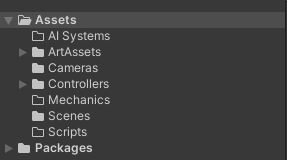
I then decided to just start at the top of the list and begin working my way down.
The controllers
Gathering the controllers together was quite easy. I already had a few that I could just drop in straight away from previous projects. I also remembered about a couple of asset packs that I had used before that worked really effectively for some of these controllers.
One of these was the First Person Controller as I had previously used a pack by Vitefait that contained all the basic aspects needed to get this up and running, and also included aspects such as jumping and crouching. Obviously this would save me a lot of time using this rather than writing my own, even though I have got a self authored first person controller already.
With this in mind I also remembered about a Third Person Controller asset pack introduced to me by some of my students by Ott which I found to be really useful to use. It contains a variety of Third Person controllers that have everything, including animation, set up on them that can be dropped straight in to a project and used as is.
However this did flag up an issue with regarding to license use. While I own this asset pack, I have only purchased a single user license so would not be able to share this out as a project for others to use. So I had to make a decision here as to what I was going to do moving forward.
The change
What I decided was to actually split this project up into two parts, one would be a Unity project with my authored content and freely available assets that I could distribute, and I would support this with a personal list of asset pack within my Unity account, that I could download and add in as needed.
So I started to look at my controllers and realised that I did not have many that were stripped out and clean, they all consisted of bespoke aspects for the projects they were part of. So I went about stripping them down and eventually ended up with all the scripts I needed for controllers.
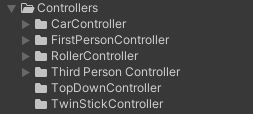
The three controllers that I did write were the Roller Controller, the Top Down Controller and the Twin Stick Controller.
Switching to art
Once I was done with the controllers, and with the new found thought process of creating a project alongside a unity asset pack list, I decided that I wanted to explore what was out there that I could just import straight in to the project or the list. As art is my weaker skill set I decided to look at what was available out there to fit this side.
Materials
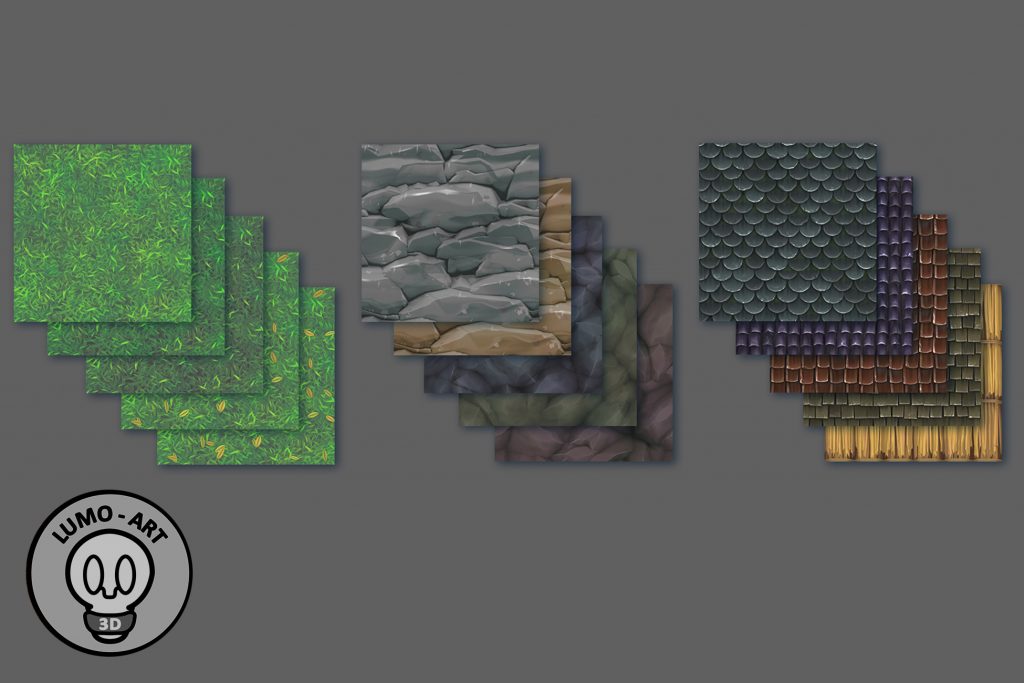
I quickly found two material packs that would be extremely useful for adding in to projects as and when I need them. The first was an Early Prototyping Material Pack and the second was a much more detailed FREE Stylized PBR texture pack.
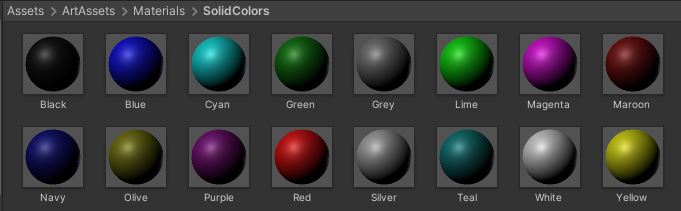
I still felt that I needed some basic solid colour materials to use, just to be able to quickly colour different aspects up if I wanted to. So I create a small set of standard colour materials within unity just using standard Albedo. In addition to this I also created a basic noise texture to add to these and created a subset that use this texture.
2D Asset Packs
As I had changed my outlook this was a no brainer for me. The assets provided by the developer Kenney are second to none when it comes to providing what I needed. So I was able to source three 2D asset packs really quickly that would allow me to create side on, top down and isometic games really quickly. These were:
- Simplified Platformer Pack – https://www.kenney.nl/assets/simplified-platformer-pack
- Top Down Shooter Pack – https://www.kenney.nl/assets/topdown-shooter
- Isometric Prototype Tiles – https://www.kenney.nl/assets/isometric-prototype-tiles
3D Asset Packs
I was also able to use this resource to find some 3D packs I could use. Thankfully due to the way the website is categorised there is really no need to add any of these into the project until I need them. As you can see from the link there are a few to choose from https://www.kenney.nl/assets?q=3d.
And Pause
So at this point I realised things were getting a little out of control. I was working on things in the project and things within my asset list. I was also running out of time so decided it would be a good point to stop and reflect.
At this point I had a project with all the controllers in and a lot of art assets, it was also growing quite large. There was also the Unity asset list that I had.
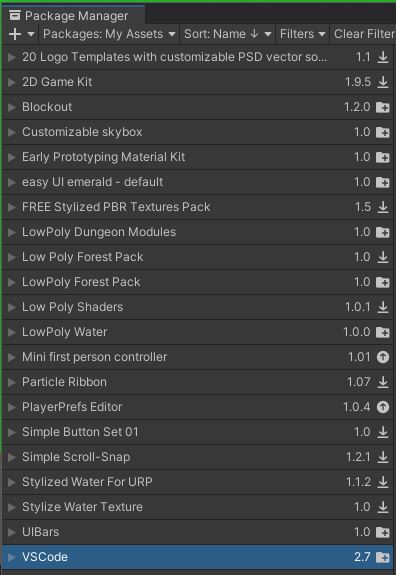
I also was not sure I was going about this the right way, when I consider the hyper casual reasoning behind why I was doing this. I realised that a single Unity project was not the right way to go about this, in fact there was absolutely no need for a project at all.
All I needed to do was to curate a decent list of Unity Asset Packs from the asset store and support this with some of my own exported packages. I have also found that you can actually store self authored unity packages on Git url so this is something I will need to explore further to see if this is a more viable option for storing these packages.
References
Unity Asset Store. 2021. Mini first person controller. [online] Available at: <https://assetstore.unity.com/packages/tools/input-management/mini-first-person-controller-174710> [Accessed 30 July 2021].
Ott, J., n.d. Character Movement Fundamentals. [online] Jan Ott – 3D Modeling & Animation, Game Design & Programming. Available at: <https://janott.weebly.com/character-movement-fundamentals.html> [Accessed 30 July 2021].
Lumo Art 3D, 2021. FREE Stylized PBR Textures Pack. [online] Available at: <https://assetstore.unity.com/packages/2d/textures-materials/free-stylized-pbr-textures-pack-111778> [Accessed 30 July 2021].
The Texture Lab, 2021. Early Prototyping Material Kit. [online] Available at: <https://assetstore.unity.com/packages/2d/textures-materials/abstract/early-prototyping-material-kit-51761> [Accessed 30 July 2021].
Kenney.nl. 2021. Kenney • Free game assets. [online] Available at: <https://www.kenney.nl/assets/> [Accessed 30 July 2021].
Technologies, U., 2021. Unity – Manual: Packages. [online] Docs.unity3d.com. Available at: <https://docs.unity3d.com/Manual/PackagesList.html> [Accessed 30 July 2021].
Technologies, U., 2021. Unity – Manual: Installing from a Git URL. [online] Docs.unity3d.com. Available at: <https://docs.unity3d.com/Manual/upm-ui-giturl.html> [Accessed 30 July 2021].
Figures
Featured Image: Photo by NeONBRAND on Unsplash
Figure 1: Charlish, R (2021) ‘Initial folder structure’ Created on July 30th 2021
Figure 2: Charlish, R (2021) ‘List of controllers’ Created on July 30th 2021
Figure 3: Lumo Art (2018) ‘FREE Stylized PRB Texture Pack’ Created on march 2nd 2018
Figure 4: Charlish, R (2021) ‘Materials in Unity’ Created on July 30th 2021
Figure 5: Charlish, R (2021) ‘Unity My Assets’ Created on July 30th 2021
0 Comments