So I have to keep a few things in mind here that I have promised to do through my reflections. The first one is to try to do more logging of my development more frequently in order to make sure I can document it all without forgetting anything.
The second is to try and make sure that I am considering my greater goals in what I am doing. I have been spending a lot of time making smaller projects that lead to nothing whereas I need to start focusing more on creating things that are more tangible.
The theme for this Rapid Ideation session is to create a prototype that solves a problem in (your) daily life.
Now my initial thoughts on this were not too great to be honest, it seems to be a very UX-centric type of theme, and personally I felt it was going to be very challenging for a game developer to accomplish this. The reason for this is the word ‘solve’, in creating something that actually solves the problem you remove the challenge. I suppose you could try and gamify the process of solving the problem and apply it in greater need or difficulty but then the problem itself has to have enough scope to be able to vary the challenge that needs solving.
So yeah I was a little stumped to begin with. But then I sat down at the end of the week and wrote my reflections. This for me was my chance to focus on my main aim for why I am doing my Masters, and thankfully because the academic year for me has finished I did not have my work in the back of my mind to distract me. I ultimately decided that I wanted to start my own game development company to make casual/hyper casual games that would run alongside my existing career in education.
Now obviously there are a lot of problems that need to be overcome in order to achieve this. Finding out how to deal with the income/tax issues of running a company while having a full time job for another company. Looking at all the legal aspects for producing games. Writing a business plan for the company to illustrate its viability. And countless more. So I wanted to make sure I was focusing on something that would help with the production/day to day operation of this company so I came up with the following SMART target.
Utilise the rapid ideation 2 project to create a boilerplate project to be used in the creation of hyper casual games for my own company. This project will be shared and stored on Github and completed by the project deadline (with on going development when needed).
So that’s where I am starting. So the first thing I wanted to make sure I could get working was the version control aspect. It has been a while since I have used Git and Github so I need to refresh the old memory. I conducted a little research into how it is best applied to Unity projects and found out a lot of new stuff.
Firstly one of the reasons I had not used Git for a while was its lack of decent support for game development file types. Git was great for smaller files but really struggled with the bigger files that are usually associated with game development. It seems this has been rectified by Git through their Git Large File Storage extension, so it was time to start downloading stuff and installing it all on to my machine.
This went pretty smoothly and thankfully GIT LFS is actually included as part of the install so I was able to get it all done in one go. There were a lot of other options to go through when installing GIT but nothing too scary and the fact that it integrates with VSCode, my preferred text editor, made this aspect of it really simple.

Next it was time to install the client I was going to use. I decided to just go with Github for Desktop because it just feels like this would be the best option as I would be using Github for my storage repositories anyway. Again this was simple enough and my old login still worked.
Now before I started setting up projects and repositories I wanted to make sure I was setting up my Unity projects correctly. I am glad I did because there was a few things I need to make sure I did to make everything run a little more smoothly. I found a question on StackOverflow about this subject and a great answer from Reed & Richmond (2019) which goes through in great detail the settings and things you need to consider when setting up a Unity project for use with Git. They also detail some great stuff on Git workflows that I have bookmarked for later reading.

So the next thing to do was to set up the link between the project itself and Github. Thankfully this is why I am using Github for Desktop as you can do this through the app and link it straight to Github. You can also set a gitignore file specifically for Unity projects that will allow Git to ignore specific file types or folders that are generic and will not be tracked.

And this is where I hit a little bit of a snag. For some reason it kept creating the Git repo within this folder but not finding all the Unity files that were in there. It had me stumped for a little while until I realised I was trying to create a repo rather than use an existing one from my hard drive. Yeah we all have those moments, still once I got over this I had the repo all set up, the project in Unity all set up and a successful publish to the site.
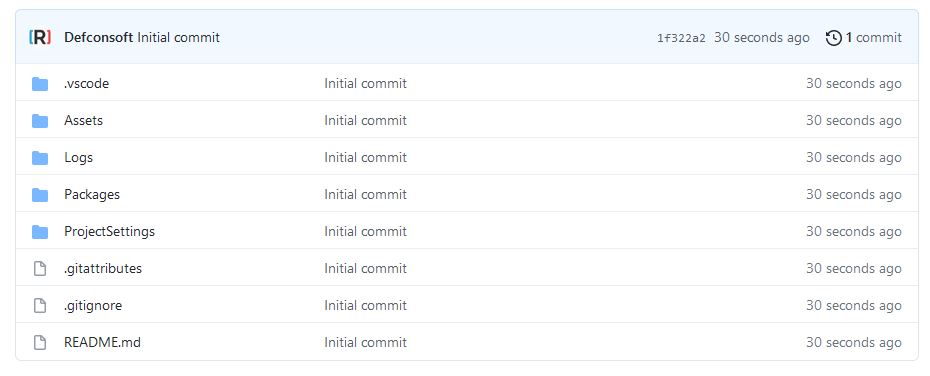
Next I will begin to work out what I need to put into this project so that I can start creating projects quickly.
References
Git Large File Storage. 2021. Git Large File Storage. [online] Available at: <https://git-lfs.github.com/> [Accessed 22 July 2021].
GitHub Desktop. 2021. GitHub Desktop. [online] Available at: <https://desktop.github.com/> [Accessed 22 July 2021].
Reed, E. and Richmond, S., 2019. How to use Git for Unity3D source control?. [online] Stack Overflow. Available at: <https://stackoverflow.com/questions/18225126/how-to-use-git-for-unity3d-source-control> [Accessed 22 July 2021].
Figures
Feature Image: Charlish, R (2015) ‘Problem Child design’ Created on 6th April 2015
Figure 1: Charlish, R (2021) ‘Git installation’ Created on 22nd July 2021
Figure 2: Charlish, R (2021) ‘Version control in Unity’ Created on 22nd July 2021
Figure 3: Charlish, R (2021) ‘Github repository creation’ Created on 22nd July 2021
Figure 4: Charlish, R (2021) ‘First Github commit’ Created on 22nd July 2021



0 Comments